How to insure your diecast collection with Diecast Detective
Diecast Detective works out an insurance value for every model you own, adds it up for your whole collection, and gives you one place to keep the photos and records an insurer will ask for.
Your insurance value
Each model's insurance value starts at its market value (DDP) in your chosen condition. You can change it whenever you'd rather use your own figure, such as for a signed or one-off piece.
Your Total Insurance Value is shown on your Portfolio and on your Virtual Collection page. That's the figure to give your insurer.
To change a model's insurance value: select the pencil in the Actions column next to the model, change the Insurance Value and Insurance Value Date, then select Update Item.
Add photos and records
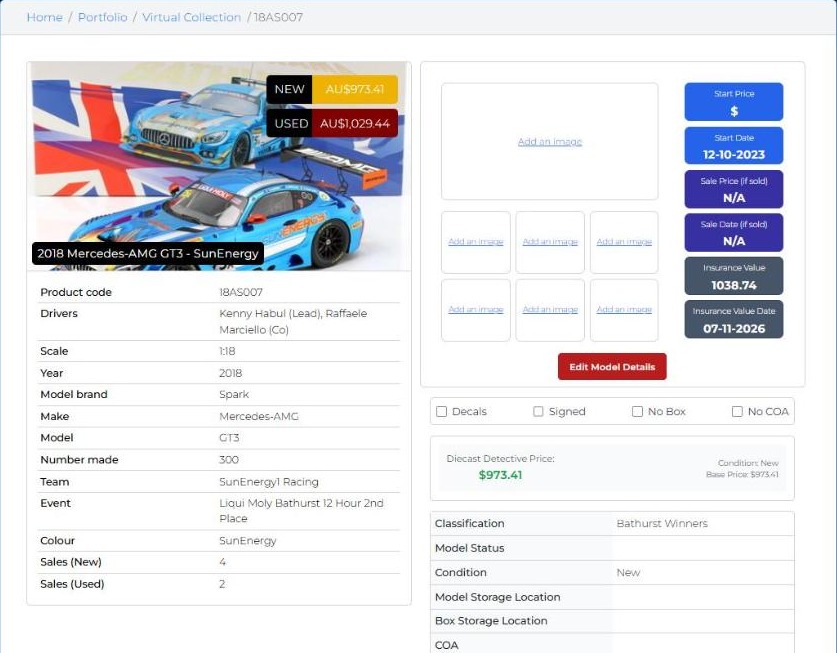
Select the eye icon in the Actions column next to a model to open its full record. Here you can:
- Upload photos of your own model, box and certificate: select Add an image in any of the photo boxes.
- Select Edit Model Details to record the Model Storage Location and Box Storage Location, such as which cabinet, room or storage unit.
- Enter its COA (certificate of authenticity) number, and any Notes.
- Tick Decals, Signed, No Box or No COA if they apply.
The record also shows your start price and date, sale price and date (if sold), and insurance value and date.
If you ever need to make a claim, you'll have photos, the location and the certificate number ready in one place.
Keep it up to date
Tip: check your insurance value every few months. A model that has jumped in price can leave you under-insured without you noticing.