How to add models to your Virtual Collection
Your Virtual Collection values every model you own, every day, and adds up its total market value and insurance value. It's included in your 14-day free trial, then needs a subscription.
Add a model from its page
- Find the model and open its page.
- Select the + at the top left of the model photo.
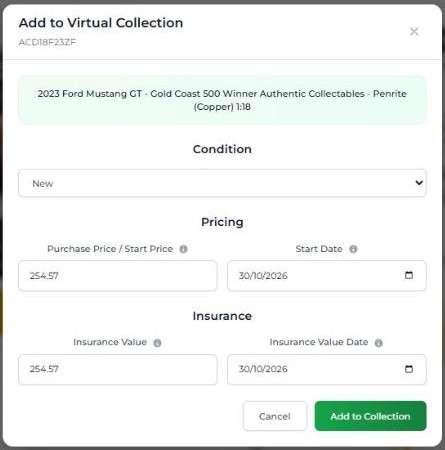
- In Add to Virtual Collection, choose the Condition: New or Used.
- Check Purchase Price / Start Price. It's filled in with today's DDP, so change it to what you paid if you know.
- Set the Start Date: when you bought it, or today.
- Check the Insurance Value and Insurance Value Date. The insurance value also starts at today's DDP, and you can change it.
- Select Add to Collection.
Tip: you can also select the + next to a model in quick search or Custom Search results, without opening its page.
Add models from inside your collection
Open Portfolio, then your Virtual Collection, and select Add New:
- Select from Database: search for a model and add it.
- Add Manually: add anything that isn't in the database, even something that isn't a model. Manually added items aren't linked to sales data, so you'll need to update their values yourself.
Add a whole collection at once
Got your collection in a spreadsheet? Use Import Collection on your Virtual Collection page to bring it all in at once. Use Export Collection to download a copy.