How to use Watchlists and Wishlists
Watchlists and Wishlists keep track of models you don't own, in named lists.
- Watchlists are for models you want to keep an eye on.
- Wishlists are for models you'd like to buy.
You can have as many of each as you like, such as "Brock" or "Kenworths".
Add a model to a list
- Select the heart at the top left of the model photo, or next to the model in search results.
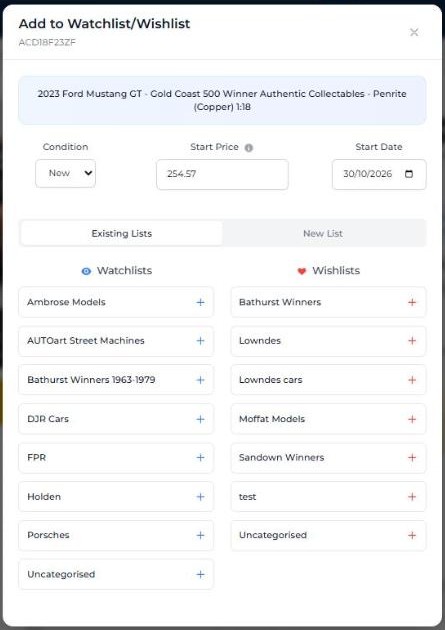
- In Add to Watchlist/Wishlist, choose the Condition you're tracking, and check the Start Price and Start Date. The start price begins at today's DDP, so you can see how the price moves from here.
- Under Existing Lists, select the + next to a Watchlist or Wishlist. Or select New List to make one.
See your lists
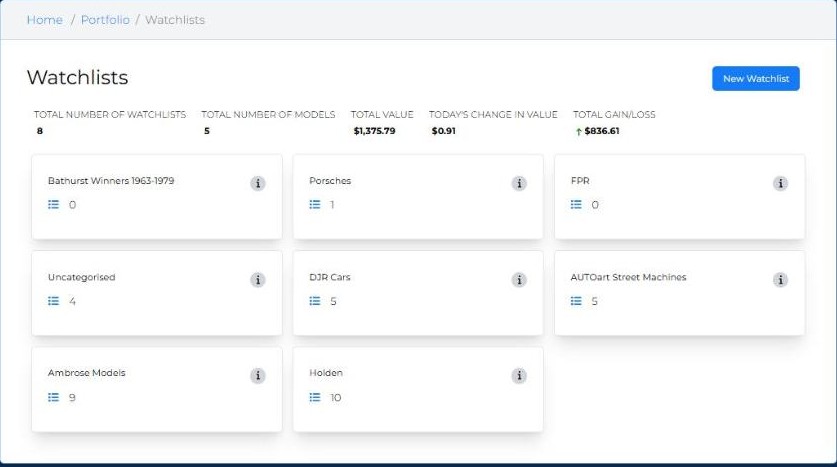
Open Portfolio and select the Watchlists or Wishlists card. Each page shows your lists, the number of models in each, and their total value, today's change and gain or loss. Select New Watchlist (or New Wishlist) to add a list.
Tip: before you buy from your Wishlist, check the model's DDP and recent sales in the condition you're buying. If the asking price is well above recent sales, you can wait or negotiate. Member Insights also shows Price Alerts when a model on your Wishlist sells.